Fuelsy: Petrol Prices UK
Petrol and diesel prices, weighed against the drive
Fuelsy is an iPhone app for UK drivers. It shows petrol and diesel prices from the Government’s Fuel Finder scheme, how far away each station is and whether it’s open, and estimates where your next fill saves most once the drive is counted.

- iPhone, iOS 26 or later
- Optimised for iPhone Duo
- UK only
- Free, with optional Fuelsy Pro
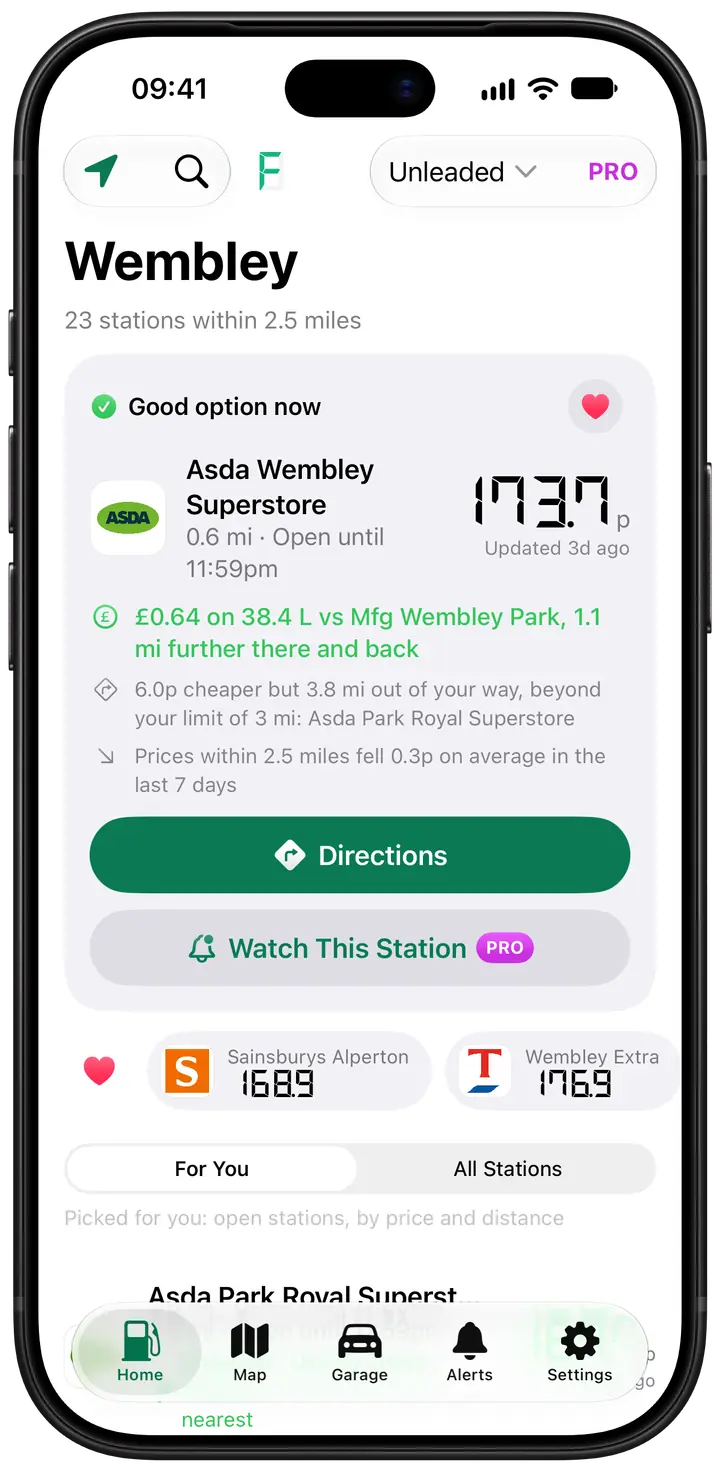
Is it worth the drive?
Your next fill looks at the stations within how far you’re happy to go out of your way, takes off the fuel to get there and back, and suggests the one with the biggest estimated saving. It shows its working, too.
What you get for free
Prices on a map and in a list, six months of price history, no limit on favourites, fill-ups with monthly spend and measured MPG, and a Garage that finds your car’s MOT history from its number plate. No ads, no account.
What Fuelsy Pro adds
Alerts on prices and estimated savings, SmartFuel’s detailed analysis, the stop on your commute that saves most, and widgets, Live Activities, CarPlay, Apple Watch and Siri. You never need it to see a price.
The full tour is on getfuelsy.com
Fuelsy’s own site goes through the app in more depth, with everything in Fuelsy Pro and what it costs. Price pages for UK stations, support and the privacy policy are on fuelsy.co.uk.
Questions
- Is Fuelsy free?
- Yes. Prices, the map, your next fill and its estimated saving, price history, favourites, fill-ups and the Garage cost nothing, and there are no ads. Fuelsy Pro is an optional monthly or yearly subscription that adds alerts, widgets, CarPlay, Apple Watch and more. Prices are free either way.
- Where do Fuelsy’s prices come from?
- From the UK Government’s Fuel Finder scheme, where retailers post their own prices. Fuelsy looks for new ones every two minutes and shows how old each price is, because a forecourt can change its prices before it reports them. Fuelsy isn’t affiliated with the Government or any fuel retailer.
- Does Fuelsy work on iPhone Duo?
- Yes. Folded, it runs on the cover display just as it does on any iPhone. Unfolded, Home keeps your stations on one side and the station you tap on the other, and the map gets a station’s page beside it. Folding or unfolding keeps your place.
More from Canopus Labs
 Eyeline TeleprompterKeep eye contact while you read: your script scrolls right beside the lens as you film.
 Spread: Recipe BookSave recipes from the web, then cook one big, clear step at a time, with timers built in.
 Fold & Play: BackgammonBackgammon, chess and draughts in one lacquered set. Play a friend, or play the computer.